
Syncthing搭建教程
Syncthing搭建教程
2. 项目展示
GitHub项目地址:https://github.com/syncthing/syncthing
文档地址:https://docs.syncthing.net/intro/getting-started.html
客户端下载:https://github.com/syncthing/syncthing/releases
本文用的Docker镜像:https://hub.docker.com/r/linuxserver/syncthing
建目录
mkdir -p /root/data/docker_data/syncthing

cd /root/data/docker_data/syncthing

nano docker-compose.yml本文用的Docker镜像:https://hub.docker.com/r/linuxserver/syncthing
镜像支持多种架构,如x86-64、arm64和armhf。
架构(Architecture) | 标签(Tag) |
|---|---|
x86-64 | amd64-latest |
arm64 | arm64v8-latest |
armhf | arm32v7-latest |
vim docker-compose.ymldocker-compose.yml填入以下内容:
原始代码:
version: "2.1"
services:
  syncthing:
    image: lscr.io/linuxserver/syncthing
    container_name: syncthing
    hostname: syncthing #optional
    environment:
      - PUID=1000
      - PGID=1000
      - TZ=Asia/Shanghai
    volumes:
      - /root/data/docker_data/syncthing/config:/config
      - /root/data/docker_data/syncthing/Documents:/Documents
      - /root/data/docker_data/syncthing/Media:/Media
    ports:
      - 8384:8384
      - 22000:22000/tcp
      - 22000:22000/udp
      - 21027:21027/udp
    restart: unless-stopped
修改后的:
version: "2.1"
services:
  syncthing:
    image: lscr.io/linuxserver/syncthing
    container_name: syncthing
    hostname: syncthing #optional
    environment:
      - PUID=0
      - PGID=0
      - TZ=Asia/Shanghai
    volumes:
      - /root/docker/syncthing/config:/config
      - /root/docker/syncthing/Documents:/Documents
      - /root/docker/syncthing/Media:/Media
      - /root/docker/flare:/flare
      - /root/docker/flare2:/flare2
      - /root/path/to/music:/Navidrome
    ports:
      - 8384:8384
      - 22000:22000/tcp
      - 22000:22000/udp
      - 21027:21027/udp
    restart: unless-stopped
PUID和PGID可以通过命令行输入id user来查看。
docker-compose up -d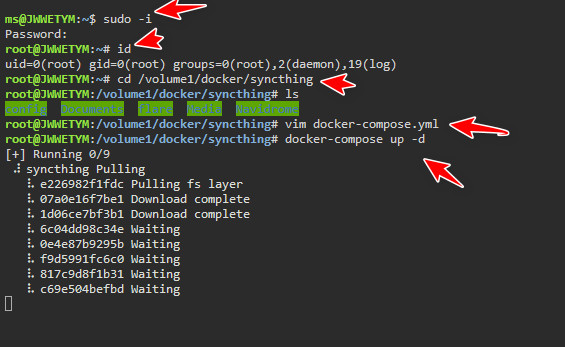
cd /root/docker/syncthing/

docker-compose down

rm -rf /root/docker/syncthing/  # 完全删除映射到本地的数据
本文链接:
/archives/1699777315101
版权声明:
本站所有文章除特别声明外,均采用 CC BY-NC-SA 4.0 许可协议。转载请注明来自
杰维特牡!
喜欢就支持一下吧

